Application Orchestrator
Application Orchestrator is responsible for taking the Application Stack definition and coordinating the provisioning of resources in the Cloud through the Cloud Broker. And then installing and configuring software stacks on the resources in a coordinated manner.
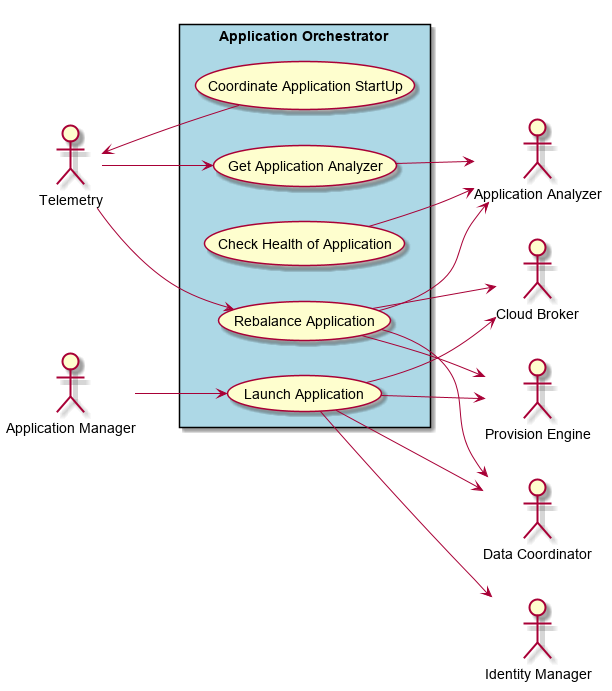
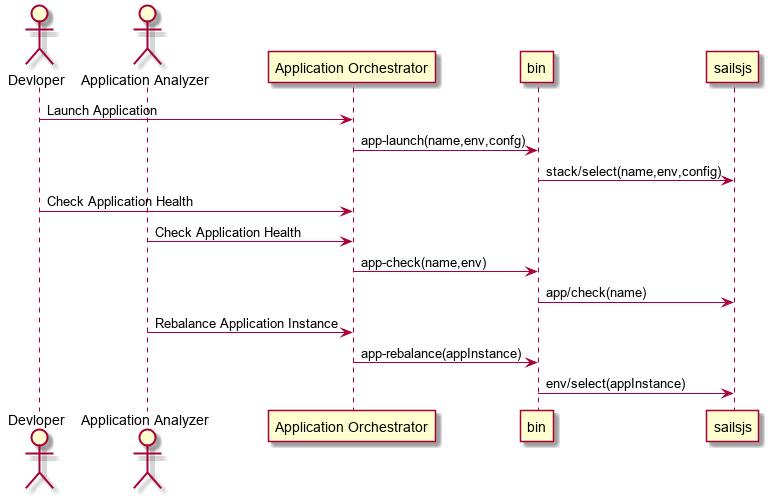
Interface
- CLI - Command Line Interface
- REST-API -
- Portal - Web Portal

Activities and Flows
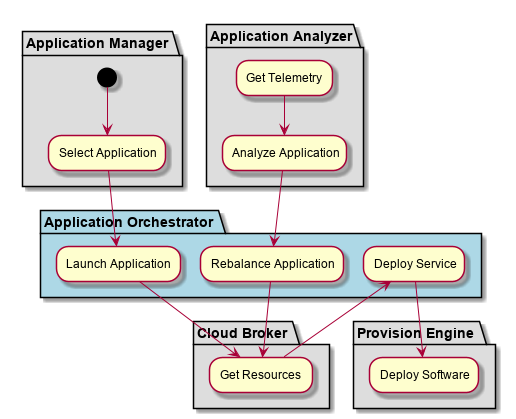
The Application Orchestrator subsystem provides the following activities and flows.
- Select an Application
- Launch Application
- Rebalance Application
- Deploy Service
- Deploy Software
Launch Application
When an application is launched the environment and application are used to select a “Stacklet” A Stacklet is an version of the Stack for the specific environmentment. The Stacklet defines what services, configuration, and policies are established for the paplication in the environment. Once the Stacklet is chosen (Simple selection application + environment) then the stacklet is traversed to find the services for the environment. Since Services can be simple (Simple image to instantiate) or complex (a aggregated nested network of services). The Services are travered to create a graph of Service Instances that are aggregated just as the Service graph is laid out.
A design decision was made to only bind the Service graph to the application when the application is launched. This late binding allows for quick changes to the application deinition through modification to service definitions. To limit the amount of change to the application stack, a version of the stacks can be used to “lock in” a specific version of the service definitions (stacks). The late binding also gives the ability to change multiple micro-services at the same time and test the changes in different environments, quickly without the lengthy process.
Mapping Service Insances to Cloud Resources
Instead of sending individual requests to the cloud broker a decision was made to send multiple requests at the same time giving the cloud broker the ability to map responses to the requests in batches instead of individually. This should increase thruput and give flexiibility to the Application Orchestrator. It cna send individual request or an array of requests. An example of a single request to the cloud broker is as follows:
let request = { instance:serviceInstance, policies: [], requirements: [
  {type: 'compute', quantity: 1},
  {type: 'storage', name:'myStorage', quantity:1000},
  {name:'myNetwork', quantity:2}
]};
The design decision has to be made on when to ask for the requests of the Cloud Broker. While the Service graph is being traversed and created, or after the complete graph is created and then sent as one big request to the brokers.
Design Discussion
July 15, 2018
Should I get resources right now. Or map the resources at the highest level of the Service graph.
Pros: If I map them right now I can reuse this method to incrementally add instances and the resources cooresponding to them.
Cons: If I push this to the top then I only have to do the mapping or request to the cloud broker once with the complete set of requests. This could mean I could optimize before I send the request. This is find for the first request coming from launch but there would be no advantage during the subsquent incremental change in service increments or decrements. For now leave it here to get the basic functionality working
Deployment Architecture
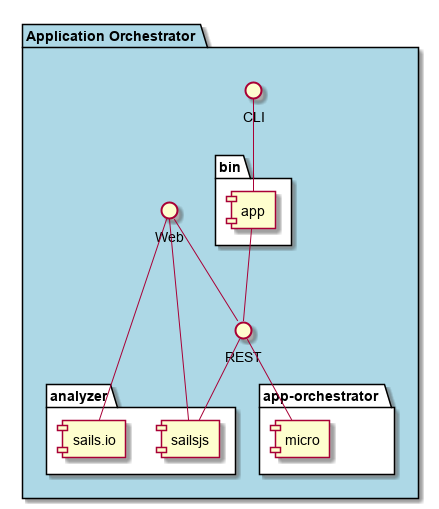
This subsystem is deployed using micro-services as shown in the diagram below. The ‘micro’ module is used to implement the micro-services in the system. The subsystem also has an CLI, REST and Web Interface exposed through a sailajs application. The sailsjs application will interface with the micro-services and can monitor and drive work-flows through the mesh of micro-services.

Physical Architecture
The Application Orchestrator subsystem is is physically laid out on a hybrid cloud infrastructure. Each microservice is shown how they connect to each other. All of the micro-services communicate to each other and the main app through a REST interface. A CLI, REST or Web interface for the app is how other subsystems or actors interact. Requests are forwarded to micro-services through the REST interface of each micro-service.
Micro Services
These are the micro-services for the subsystem. The combination of the micro-services help implement the subsystem’s logic.